

Introduction to Ergonomics and Laptop Use
In the modern age, laptops have become essential tools for work, study, and leisure. However, prolonged laptop use can lead to a range of physical health issues if ergonomic principles are not applied. Ergonomics is the science of designing work environments and products to optimize human well-being and overall system performance. It focuses on adapting tasks, equipment, and environments to fit the user to prevent discomfort and injury.
As individuals engage in extended sessions of laptop use, they may experience various health-related problems. For example, common issues include back pain, neck strain, and wrist injuries, which are often a byproduct of poor posture and repetitive motions. Users frequently find themselves hunching over their devices, which contributes to the misalignment of the spine, leading to chronic discomfort. Similarly, keeping the wrists at awkward angles while typing can result in conditions such as carpal tunnel syndrome.
To combat these detrimental effects, the adoption of ergonomic laptop accessories is crucial. These tools are designed to enhance comfort and reduce the risk of injuries associated with laptop usage. Ergonomic keyboards and mouse devices can provide better support for the wrists, while laptop stands can elevate the screen to eye level, promoting better posture and reducing strain on the neck and back.
Understanding the significance of ergonomics in laptop use is vital for maintaining a healthy work routine. As more individuals rely on laptops for extended periods, investing in ergonomic solutions becomes not merely advisable, but necessary for long-term well-being and productivity. In the subsequent sections, we will explore various ergonomic laptop accessories that can help mitigate the risks mentioned above and create a more favorable working environment.
Table of Contents
Understanding Ergonomic Accessories
Ergonomic accessories are specifically designed tools that aim to enhance comfort and efficiency while working with laptops. In a world increasingly reliant on technology, spending long hours in front of screens has become common, making the need for ergonomic solutions essential. These accessories are engineered to support the user’s body in maintaining a natural posture, thereby reducing strain and the risk of potential injuries that can arise from prolonged laptop use.
Various types of ergonomic accessories exist, each catering to specific needs. Keyboards that are designed to keep the wrists in a neutral position, for example, can significantly reduce discomfort associated with repetitive movements. Laptop stands can elevate the screen to eye level, which helps in minimizing neck and back strain. Additionally, ergonomic mouse devices, including vertical mice, promote a more natural hand position, decreasing the likelihood of conditions like carpal tunnel syndrome.
Moreover, other accessories such as wrist rests and footrests further contribute to an enhanced working environment. Wrist rests provide support for the forearms while typing, whereas footrests can improve circulation and support proper posture by keeping feet flat on the ground. When using these accessories, users often report increased productivity, as they can work for extended periods without experiencing fatigue.
In essence, incorporating ergonomic accessories into one’s workspace is not merely a trend but a necessity for anyone relying on laptops for daily tasks. By choosing the right ergonomic tools, individuals can create a comfortable, efficient working environment that fosters well-being and supports long-term health.
Key Ergonomic Accessories for Laptops
In the realm of laptop computing, an ergonomic setup plays a crucial role in promoting comfort and efficiency. Key ergonomic accessories contribute significantly to the overall user experience, especially for individuals who spend prolonged hours using their laptops. Below are some essential ergonomic accessories that every laptop user should consider incorporating into their workspace.
Laptop Stands: A laptop stand is a fundamental accessory that elevates the device to eye level. This adjustment helps maintain a neutral neck position, which reduces strain in the neck and shoulders. Adjustable stands offer versatility, allowing users to alternate between sitting and standing positions. It is recommended to select a stand that is sturdy yet light for easy portability.
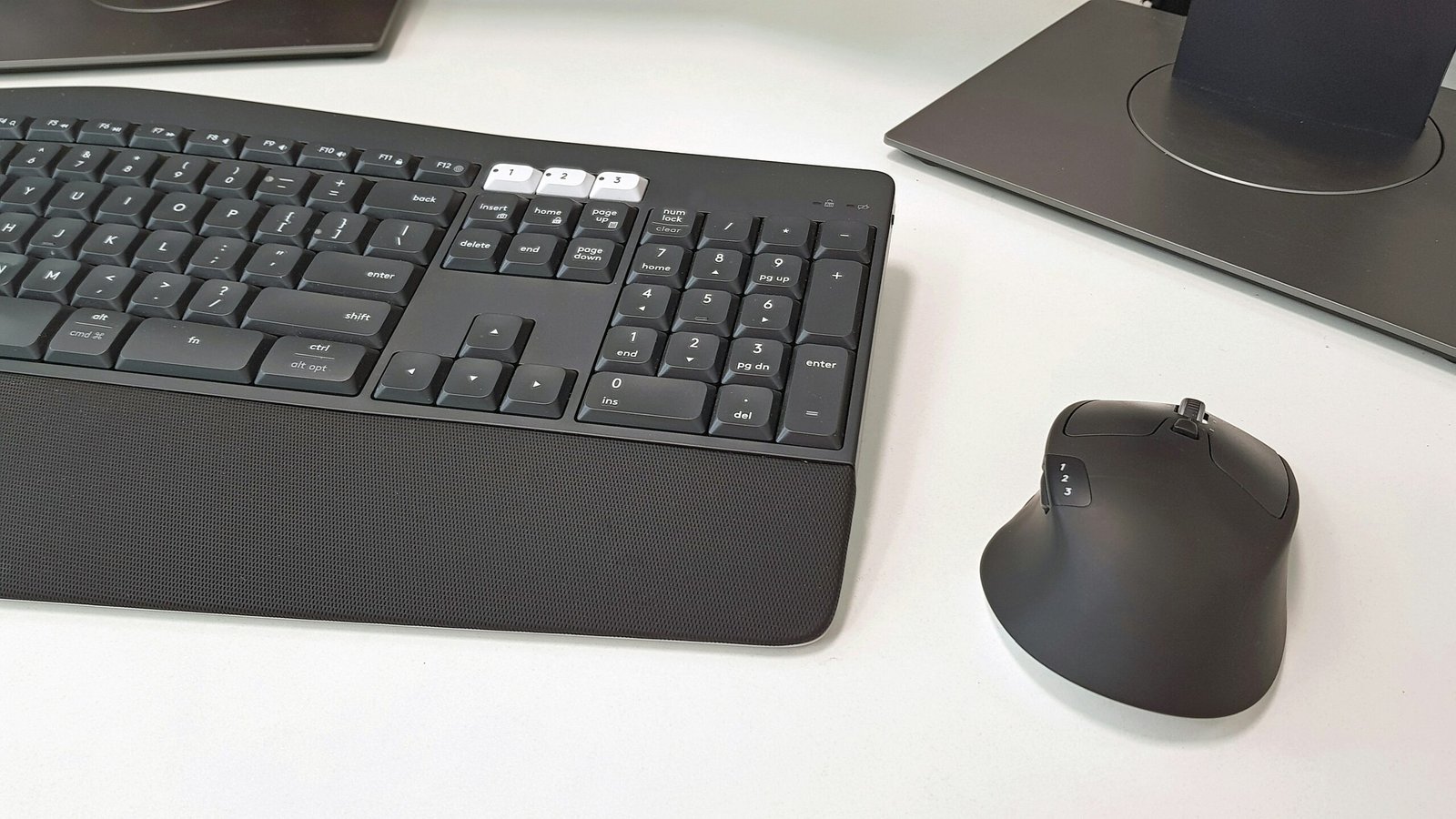
External Keyboards: Using an external keyboard can vastly improve typing posture and comfort. Ergonomic keyboards are designed to reduce strain on the wrists, offering either a split design or a cushioned palm rest. This accessory not only enhances typing comfort but also allows the laptop screen to be positioned at a proper height, encouraging a healthier posture.
Mouse Designs: A good ergonomic mouse can significantly decrease the risk of repetitive strain injuries, such as carpal tunnel syndrome. Options such as vertical mice, which keep the wrist in a more natural position, or trackballs, which allow for minimal wrist movement, are highly recommended. Choosing a mouse that fits comfortably in hand is essential for prolonged use.
Wrist Rests: Wrist rests provide support during keyboard and mouse use, helping to maintain a neutral wrist position. They can be made from various materials such as gel or memory foam, catering to personal comfort preferences. Proper use of wrist rests can alleviate pressure and reduce fatigue during extended computer sessions.
By utilizing these ergonomic accessories, laptop users can greatly improve their workspace and reduce discomfort, leading to a more productive computing experience.
Factors to Consider When Choosing Ergonomic Accessories
When selecting ergonomic laptop accessories, a number of critical factors should be considered to enhance comfort and productivity during use. Height adjustability is one of the foremost attributes; this feature allows users to set their devices to an optimal level, helping maintain a neutral posture and reducing strain on the neck and back. Furthermore, look for accessories that offer a range of height adjustments, as individual preferences for screen elevation can vary widely.
Additionally, the quality of the materials used in ergonomic accessories is paramount. High-quality materials not only increase longevity but also contribute to the overall comfort of the user experience. For instance, accessories made of breathable fabric, memory foam, or sturdy plastic can aid in better posture support and cushioning. Therefore, it is advisable to invest in items that are crafted with durability and comfort in mind.
Portability is another significant factor, particularly for users who frequently travel or work in various locations. Lightweight and compact ergonomic accessories are preferable as they allow for easy transport without compromising on comfort. Accessories such as portable laptop stands and foldable keyboard and mouse options can significantly enhance ergonomic support on the go.
Finally, personal preferences should not be overlooked. Every individual has unique ergonomics needs based on their body type, working habits, and personal preferences. Consider trying various accessories to determine what feels best for you. Sitting posture, typing preferences, and visual comfort can greatly influence the choice of ergonomic accessories, making individual testing and adjustment critical for a satisfactory experience.
Popular Brands and Products in Ergonomic Accessories Market
In the realm of ergonomic laptop accessories, several brands have established themselves as leaders by offering high-quality products designed to enhance comfort and productivity. Notable among these brands are Logitech, Humanscale, 3M, and Kensington. Each of these manufacturers provides a variety of products, catering to different user needs and preferences.
Logitech is widely recognized for its ergonomic keyboards and mice, which are designed to minimize wrist strain and increase comfort during prolonged use. The Logitech MX Keys keyboard is particularly popular; its low-profile design and tactile feedback make it suitable for extended typing sessions. User reviews frequently mention the ease of use and positive impact on user comfort.
Humanscale focuses primarily on workplace ergonomics, with products like the Diffrient Chair and the Self-Levelling Laptop Stand. The chair is noted for its adjustable features, enabling users to achieve a personalized seating position, while the laptop stand enhances posture by elevating the screen to eye level. Consumers appreciate the durability and design of Humanscale products, often citing improved work satisfaction.
3M is another brand that offers a range of ergonomic innovations, including wrist rests and monitor stands. Their Gel Wrist Rest is particularly favored by those who use laptops for extended periods, as it provides comfort and reduces the risk of repetitive strain injuries. Reviews from users highlight the quality of materials and excellent support.
Kensington is known for providing affordable ergonomic solutions, with products like the SmartFit Easy Riser Laptop Stand. This portable stand allows users to adjust their laptop height, which in turn promotes better posture. Positive user feedback often mentions its lightweight design and practicality for on-the-go use.
Overall, the ergonomic accessories market is diverse, with numerous brands offering products that significantly enhance the user experience. Each brand and product provides unique features tailored to meet the varying needs of users, making it crucial for consumers to evaluate their specific requirements when selecting ergonomic solutions.
Setting Up an Ergonomic Workspace
Creating an ergonomic workspace is essential for promoting comfort, reducing strain, and enhancing productivity. The first step is to position your laptop at a comfortable height. Ideally, the screen should be at eye level, allowing you to maintain a neutral neck position. A laptop stand can be a valuable addition for this purpose, enabling you to adjust your screen height to an ergonomic level. For a coordinated setup, consider using an external keyboard and mouse, which will allow your arms to rest comfortably at a right angle.
Next, choose a chair that provides adequate support and adjust its height to ensure your feet are flat on the ground or on a footrest. The chair’s backrest should support the natural curvature of your spine to encourage good posture. When seated, your elbows should ideally form a 90-degree angle, with forearms parallel to the floor. If your chair does not provide lumbar support, using a cushion or an adjustable back support can greatly enhance comfort during long working hours.
Your desk height plays a crucial role in setting up an ergonomic workspace. Make sure that the desk allows for adequate leg clearance, allowing your knees to move freely underneath. A sit-stand desk can be beneficial, offering flexibility to alternate between sitting and standing positions, which can reduce the risks associated with prolonged sitting.
Lastly, don’t overlook the importance of accessory integration. This includes items like document holders that keep reference materials at eye level, and cable management solutions to maintain a clutter-free workspace. Make adjustments based on your body measurements and preferences to tailor an ergonomic environment that enhances both comfort and efficiency.
Benefits of Using Ergonomic Laptop Accessories
In the modern work environment, where laptops have become a standard tool for daily tasks, integrating ergonomic laptop accessories is essential for enhancing the user experience. One of the primary benefits of these accessories is their ability to mitigate health risks associated with poor posture and prolonged computer use. Traditional laptop configurations can lead to musculoskeletal issues, including neck strain, back pain, and repetitive stress injuries. Ergonomic accessories, such as laptop stands and external keyboards, help to adjust the laptop’s height and angle, promoting a more neutral position for the body and reducing the strain on crucial muscle groups.
Furthermore, the introduction of ergonomic laptop accessories can significantly improve productivity. When the workspace is designed with ergonomics in mind, individuals are less likely to experience discomfort during long working hours. A more comfortable working posture increases focus and reduces fatigue, thus enabling users to concentrate on their tasks more effectively. For instance, using an ergonomic mouse can improve hand positioning and reduce wrist strain, allowing for longer periods of efficient work without the risk of injury.
Additionally, the use of ergonomic accessories enhances overall comfort in the workspace. Accessories like padded wrist rests and adjustable chairs provide necessary support, making the work environment more enjoyable. This comfort extends beyond physical health; it also contributes to mental well-being. Employees who experience less discomfort are generally happier and more satisfied in their roles. A well-designed ergonomic setup can facilitate a more positive work atmosphere, leading to increased morale and improved collaboration among team members.
Common Misconceptions About Ergonomics
Ergonomics is a discipline often misunderstood, leading to several misconceptions that can hinder individuals from utilizing essential ergonomic accessories. One prevalent myth is that ergonomics is only relevant to those with pre-existing injuries or conditions. While it is true that ergonomic solutions can significantly benefit individuals coping with discomfort, prevention should also be a core focus. Adopting ergonomic practices and using the right accessories can prevent the onset of issues such as carpal tunnel syndrome, chronic back pain, and eye strain, making ergonomics essential for everyone.
Another common misconception is that investing in ergonomic products is an unnecessary expense. On the contrary, the long-term benefits of these accessories can far outweigh initial costs. High-quality ergonomic chairs, adjustable laptop stands, and proper keyboard placement can lead to enhanced productivity and decreased healthcare expenses over time. Moreover, when individuals experience discomfort, their focus and efficiency can wane, resulting in lost productivity that could have been avoided with thoughtful ergonomic design.
Furthermore, there is a belief that implementing ergonomic principles requires extensive changes to one’s workspace, which can be daunting. In reality, small adjustments can yield significant improvements. Simple actions such as adjusting screen height, positioning the keyboard and mouse correctly, and even incorporating a footrest can transform a workstation into an ergonomic-friendly environment without requiring a complete overhaul.
Lastly, the notion that ergonomic accessories are one-size-fits-all is misleading. Ergonomics is about adaptation and personalization; individuals should select products that suit their unique needs and preferences. Investing the time to understand and implement ergonomic practices will foster a healthier and more sustainable work environment for all, regardless of whether one currently suffers from ailments.
Conclusion and Final Thoughts
In the contemporary workplace, the significance of ergonomic laptop accessories cannot be overstated. As individuals increasingly rely on laptops for prolonged periods, the need for accessories that promote comfort and health becomes essential. Ergonomic products such as laptop stands, external keyboards, and supportive chairs are designed to enhance posture, reduce strain, and foster a healthier work environment.
Throughout this guide, we have explored various ergonomic accessories and their impact on overall health. Using the right tools can significantly minimize the risk of developing musculoskeletal disorders, which are common among those who spend long hours seated in front of a screen. For instance, elevating the laptop to eye level not only helps prevent neck strain but also encourages users to maintain a more natural posture.
Moreover, ergonomic accessories assist in boosting productivity by allowing users to work more comfortably for extended periods. A well-designed workspace, equipped with the right ergonomic tools, paves the way for increased focus and efficiency. The integration of features such as adjustable heights, proper wrist support, and flexible positioning plays a vital role in this transformation.
As we revisit the essential role of ergonomic accessories, it becomes clear that investing in one’s workspace is an investment in health and well-being. We encourage readers to assess their current setups and take proactive measures toward enhancing their ergonomics. Implementing even a few changes can lead to substantial improvements in comfort and productivity. In conclusion, making these adjustments is not only beneficial but necessary for long-lasting health benefits.